
Thursday, February 27, 2020
View more at my Medium blog
For more posts on product development, product management and business strategy, please see my new Medium blog at:


Monday, August 17, 2015
Business Process – the missing element from Delve?
Microsoft Delve is an interesting new cloud product that attempts to bring together the many information sources a typical enterprise business user is interested in so that they can make sure they know what they need to.
It is often simplified to talk about finding people through content, or content through people.

Leaving aside the similarities with stalking work colleagues, it does seem to offer some value. One potential use case I heard of was finding all presentations presented to me in the last 12 months.
Delve is based around the Office Graph, which gathers data from across Office 365 and other tools (even eventually ones from ISVs). The idea seems simple enough:

The two relationship types they currently support are “Trending Around” (content related to a specific person) and “Working With” (people working with a specific piece of content). Graph edges are relationships and the nodes can be people or content (documents or conversations).
Clearly this could be very useful, but I think the missing element is business process.
Now traditionally we have represented the business process in a number of ways. perhaps it was the location (e.g. a Virtual File), a piece of metadata (e.g. project name), or just when it occurred (e.g. Collaborate 2015). These are all fairly imprecise, and one of the issues with business process as an idea is that you can have more than one present at a given moment in time.
For instance, this weekend I ended up paying $36 for internet access at the hotel my employer had our annual conference at. I am planning on expensing that amount on Monday. There are three business processes this involves:
In a graph we could add business process as another node, but that doesn’t involve it in the relationship between person and content the way we would want to. However, custom content types are going to be added soon, so the API would allow us to add a business process node easily enough. But would we link the piece of content, or the person to it?
We could make it an attribute of relationship, but that might limit our ability to query it (or not – see the idea of looking for content presented to me). Given there is a potential one-to-many relationship between a given edge (relationship) and business processes, it might requires changes to the Office Graph from Microsoft to give us that functionality.
There is another technical problem, which is how do we capture the relevant business processes that are involved in these person/content relationships? Do we ask users to act like lawyers and specify at every minute of the day what business processes they are involved in? Do we merely make them hashtags and allow people to tag everything they do, if they choose to do so? Is there some automated process that will prompt people to classify their content based on the meaning detected in the words they use?
Personally I think there is some real value in using hashtags – but they must be understood in the context of that person’s role, activities and context. So I might have tagged that expense reimbursement with these hashtags:
Those context variations to the hashtags require some rules, some intelligence, be applied to my hashtags in order to derive a better set of processes. That is hard, and that is where I would expect an app might want to call out to <handwave> (Cortana and the Office Graph?) to find info that would help solve the problem. We would also want other apps (CRM, ERP, etc) to support this sort of tagging, so their content could be properly understood as well. It sounds improbable, but interesting I think …
More info about the actions available as edges.
It is often simplified to talk about finding people through content, or content through people.

Leaving aside the similarities with stalking work colleagues, it does seem to offer some value. One potential use case I heard of was finding all presentations presented to me in the last 12 months.
Delve is based around the Office Graph, which gathers data from across Office 365 and other tools (even eventually ones from ISVs). The idea seems simple enough:
The two relationship types they currently support are “Trending Around” (content related to a specific person) and “Working With” (people working with a specific piece of content). Graph edges are relationships and the nodes can be people or content (documents or conversations).
Clearly this could be very useful, but I think the missing element is business process.
Now traditionally we have represented the business process in a number of ways. perhaps it was the location (e.g. a Virtual File), a piece of metadata (e.g. project name), or just when it occurred (e.g. Collaborate 2015). These are all fairly imprecise, and one of the issues with business process as an idea is that you can have more than one present at a given moment in time.
For instance, this weekend I ended up paying $36 for internet access at the hotel my employer had our annual conference at. I am planning on expensing that amount on Monday. There are three business processes this involves:
- The expense reimbursement business process.
- But the expense was only necessary because we were offsite at Activate 2015, so it was part of the Activate conference.
- The internet access was required because my flatmate at the time needed to upload a user research prototype for our Connect product.
In a graph we could add business process as another node, but that doesn’t involve it in the relationship between person and content the way we would want to. However, custom content types are going to be added soon, so the API would allow us to add a business process node easily enough. But would we link the piece of content, or the person to it?
We could make it an attribute of relationship, but that might limit our ability to query it (or not – see the idea of looking for content presented to me). Given there is a potential one-to-many relationship between a given edge (relationship) and business processes, it might requires changes to the Office Graph from Microsoft to give us that functionality.
There is another technical problem, which is how do we capture the relevant business processes that are involved in these person/content relationships? Do we ask users to act like lawyers and specify at every minute of the day what business processes they are involved in? Do we merely make them hashtags and allow people to tag everything they do, if they choose to do so? Is there some automated process that will prompt people to classify their content based on the meaning detected in the words they use?
Personally I think there is some real value in using hashtags – but they must be understood in the context of that person’s role, activities and context. So I might have tagged that expense reimbursement with these hashtags:
#expense #Activate2015 #ConnectUX
But they way those might be interpreted might vary by context. For example, #expense will be associated with the sort of expenses I am allowed – perhaps “discretionary travel expenses”. Further to that, #ConnectUX will be regarded due to the time period as relating to the Connect user experience research being conducted between the 10th and 21st of August.Those context variations to the hashtags require some rules, some intelligence, be applied to my hashtags in order to derive a better set of processes. That is hard, and that is where I would expect an app might want to call out to <handwave> (Cortana and the Office Graph?) to find info that would help solve the problem. We would also want other apps (CRM, ERP, etc) to support this sort of tagging, so their content could be properly understood as well. It sounds improbable, but interesting I think …
More info about the actions available as edges.
Tuesday, February 24, 2015
Stewardship vs Governance, is there a difference?
Early last year, Andrew White at Gartner asked the question When Information Governance and Stewardship Efforts Differ…do they?
He was dealing with the sort of grey line where two terms that almost equate to each other are used interchangeably or at least close to each other.
Information governance is something we concern ourselves a lot at Objective, so I was interested, and stewardship is something often talked about in Christian circles, so thinking about it in terms of information is also interesting.
Without just referencing online dictionaries/thesauri I would give the following definitions myself:
Update: I certainly don't think stewardship is '13 minutes a week' as this Gartner blog post suggests!
He was dealing with the sort of grey line where two terms that almost equate to each other are used interchangeably or at least close to each other.
Information governance is something we concern ourselves a lot at Objective, so I was interested, and stewardship is something often talked about in Christian circles, so thinking about it in terms of information is also interesting.
Without just referencing online dictionaries/thesauri I would give the following definitions myself:
Information Governance
Information governance is concerned with ensuring that we govern the way our organisation creates, consumes, collects and stores the information necessary to fulfil our purpose. It has connotations of restrictions, rules, compliance and auditing. It emphasises controls, policies and risk analysis.
Information StewardshipI think you could implement either of these concepts and find you were not doing the other. Both are desirable, but their emphasis is slightly different and they may indeed be two sides of the same coin. Perhaps it’s the classic dichotomy between cost and revenue, or pessimism and optimism at work.
Information stewardship is concerned with ensuring that we derive value from the information our organisation creates, consumes, collects and stores. It has connotations of exploitation, efficiency, profiting and judging. It emphasises usefulness, ease of access and valuation.
Update: I certainly don't think stewardship is '13 minutes a week' as this Gartner blog post suggests!
Wednesday, October 22, 2014
Evaporating Web Records
You’re hip, you’re cool – ‘business enablement’ is your middle name, and you’ve got social media accounts, blogs, forums, Atom/RSS feeds and wikis rocking and rolling. As Chief Records Officer (CRO) you help your agency move into the 21st Century full speed ahead.
Except. Things are never that easy, and what we find is web records are sadly missing.
We know that a short URL was used in this tweet, but 2 years later the URL has been re-used and no longer points where it did when we created the tweet. Worse yet, we relied on identifying records at creation and we missed one, it never got recorded and Facebook’s API is refusing to give it to us.
The wiki system was migrated to a new platform and the old edit history has been lost – worse the new system tracks comments in a different form and they have been lost too.
An ill-considered rollout of a new website neglected to ensure that all of our old URLs were migrated, and apart from losing Google ranking, we also now can’t identify what content a user might have seen on a given date for a given URL.
In other words, our web records are evaporating. It’s not your EDRMS that’s failing, it’s the fact that all of these web systems exist outside the EDRMS and compliance needs are seen as a secondary (unimportant?) requirement for replacement systems. Practical needs for delivering services now are overwhelming the old centralised compliance needs.
The “Review of Social Media and Defence” report in 2011 by George Patterson Y&R is a good example of the sorts of problems agencies face:
“Given the dynamic nature of social media communications and the collaborative approach to the creation of user generated content, Defence will need to take particular care to ensure that such content is properly identified as a Commonwealth record as and when it is created. An accurate and authentic copy of such content will need to be captured and saved as a record so as to ensure that obligations under the relevant auditing, recordkeeping and disclosure legislation can be met. This is likely to require the development of a specific Defence social media records policy that provides guidance for each particular social media channel to be used by Defence during Professional Use.”
Review of Social Media and Defence, p.102
“The simplest interpretation of international record-keeping policy is that all outgoing communication should be housed on an official website that provides both a credible source for the community and a method of archiving content. The content can then be shared easily into social media, and important or significant conversations can be selected for archiving.”
Review of Social Media and Defence, p.124
“Because the National Archives of Australia (NAA) considers social media to simply be channels in which Commonwealth records can be shared, existing record management and archiving protocols need to be followed. The challenge lies in identifying commonwealth records worthy of archiving but also in the resourcing and processes required to ensure compliance. The government’s response to the Government 2.0 Taskforce (p. 15) states explicitly that the Archives will produce guidance on what constitutes a Commonwealth record in the context of social media. The NAA should be consulted to provide greater clarification for DEOC.”
Review of Social Media and Defence, p.157
Rebecca Stoks produced an academic paper in October 2012 that summarised a survey of actual recordkeeping practices for social media records amongst Australian government agencies (mostly state (33), but some local (20) and federal(9) agencies). Her summary was damning:
“The transient nature of social media opposes traditional recordkeeping methods; consequently, most government agencies are not meeting their legal obligation to keep records.”
“In this study, only a minority of government agencies were found to be capturing social media records. Most of those capturing records were not very confident that they are meeting their legal obligations or that their methods are sustainable. Within the sample, the level of internal support, be it strong or lacking, was found to affect the degree to which social media records were being captured. Although well regarded as a resource, the guidance provided by PROs did not seem to have an impact on whether or how agencies were capturing records, with several respondents expressing a desire for more practical advice.”
Taming the Wild West: Capturing Public Records Created on Social Media Websites, p.8
Taming the Wild West: Capturing Public Records Created on Social Media Websites, p.48
What do we want to know about web records when we capture them?
- URL
- AGLS meta-data (author, publish date/time, country, copyright, etc)
- Re-use (trackbacks, retweets, inbound links, ratings, likes, votes)
- Outbound links, and their status (if they redirect, then to what URL? do they have meta-tags set like NoFollow?)
- Linked resources (images, JavaScript, iframes, Flash files, video/audio) – not always useful, but worth bringing images into content as an embedded image at very least
- Conversations started by the record (comments, replies, threads in general)
- Relative site-map location compared to other web records (requires the concept of a site, perhaps leverage Google site maps?)
Much of this comes from Atom/RSS feeds, but some of it requires post-capture processing.
How do we want to see web records that we capture?
- As an HTML page, even though stored as XML.
- As a PDF, even though originally seen as an HTML page and stored as XML.
Of course this only gets us 80% of what we need, there will always be the missing context of what the page design looked like when that content was displayed (and what other content was dynamically displayed alongside it). With social media there is also the context of an responses, retweets, likes, shares or trackbacks to consider.
Do we organise web records by the site they belong to, the Atom/RSS feed they come from, or by some other more definite measure?
I don’t know anyone that has all the answers to those questions, I’m not even sure I know that many people that care about all those questions! However, I do know that without those answers there are essential government records that are literally evaporating every minute of the day, never to be seen again, or known about. They may not be important now, they may not ever be important, but our lack of care with them is likely to be lamented by future generations seeking to understand what motivated, inspired and drove us into action (or not).
Tuesday, October 21, 2014
Collaborate 2014 Roundup
We just finished another Collaborate conference for Objective Corp's international customers and it was a great effort by all; staff, partners and customers included.
The amount of effort that goes into the event is extraordinary, but the payoff is an event that informs, excites and inspires our customers to get more value from their Objective products (ECM, ECC and Connect) and change the way their organisations impact the world.
A big part of that is helping them drive business process innovation so they can deliver better services and products to the public.

Something we are doing across our products is looking to deliver great user experiences, especially ones that are customised for our customers' organisations so that they are received by their end users with credibility.
One of the challenges that raises is what an old colleague of mine used to call the "pink flamingo effect":

This is the tendency of some people to go wild with any sort of HTML customisation and add what they assume is an attractive element (e.g. pink flamingos) to an otherwise functional page.
We can't prevent that altogether, but a big part of the move we're making is to educate customers about the sorts of things they should consider customising (logos, fonts, colours) and how to consider the user experience when customising things that we have carefully designed, such as our responsively designed sample email templates.
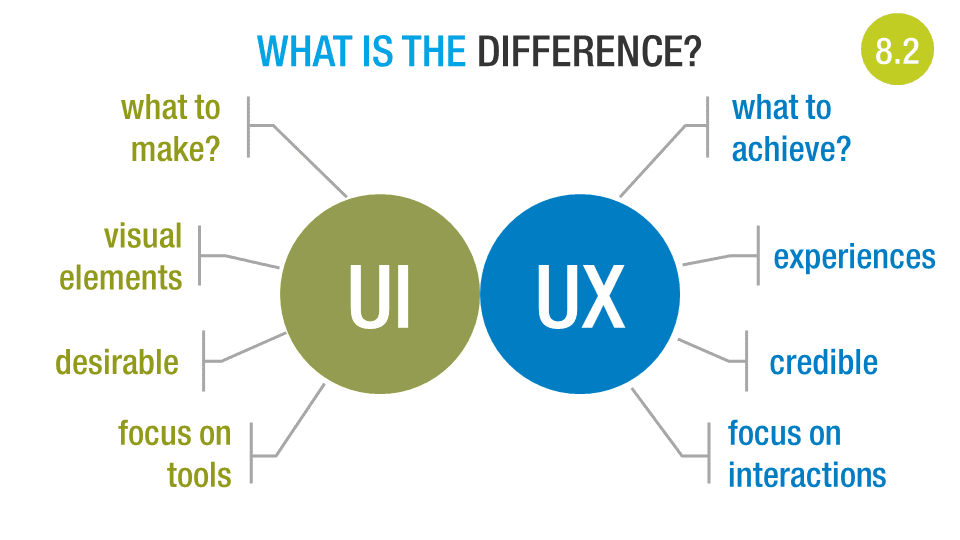
To that end the slide above was used to help explain the difference between user interfaces (UI) and user experiences (UX).
Edit: See more about UI vs UX at my colleague David Eade's blog.
The amount of effort that goes into the event is extraordinary, but the payoff is an event that informs, excites and inspires our customers to get more value from their Objective products (ECM, ECC and Connect) and change the way their organisations impact the world.
A big part of that is helping them drive business process innovation so they can deliver better services and products to the public.
Something we are doing across our products is looking to deliver great user experiences, especially ones that are customised for our customers' organisations so that they are received by their end users with credibility.
One of the challenges that raises is what an old colleague of mine used to call the "pink flamingo effect":
This is the tendency of some people to go wild with any sort of HTML customisation and add what they assume is an attractive element (e.g. pink flamingos) to an otherwise functional page.
We can't prevent that altogether, but a big part of the move we're making is to educate customers about the sorts of things they should consider customising (logos, fonts, colours) and how to consider the user experience when customising things that we have carefully designed, such as our responsively designed sample email templates.
To that end the slide above was used to help explain the difference between user interfaces (UI) and user experiences (UX).
Edit: See more about UI vs UX at my colleague David Eade's blog.
Updated blog template
It's been a few years since I updated the template my blog uses, so I've taken the chance now to simplify things and apply a template that seems less busy and more modern. I've also updated the fonts to make them more readable on modern screens.
Friday, January 18, 2013
You need consumer-grade usability
It’s interesting watching the English language evolve in response to technology and changing cultural ideas. Take the term “consumer-grade”, this used to (and sometimes still does) mean, lower quality, less robust construction.
Compare it to “weapons-grade”, a term commonly applied to uranium and plutonium, but simply meaning it is a substance pure enough to to be used to make a weapon or has properties that make it suitable for weapons use. “Export-grade” is similarly used to define food or beverage that is better than average, and worthy of consumption away from its place of production. Some people seem to confuse the two.

So you might be confused by someone espousing “consumer-grade usability” as a good thing … confused that is, if you lived in 1999 and knew nothing about the history of consumer devices in the 21st century … you know, the whole iPod, iPhone, iPad, Alienware, LCD televisions, Android and “just google it” thing?
Now that we are living in an increasingly BYOD world it is obvious what the term means. It is a purity of user interface design that brings the essential features of the device or application to the fore, and frees anyone to use it with confidence and passion.
It’s easy to see how this came about, “consumers” includes everyone, “enterprise users” are a small subset of the working population, itself a subset. When creating for the consumer it has become obvious that success increasingly comes from great usability – even when competing in the budget end of the market. This means everyone gives usability lip-service, hence the rise in usability consultancies.
Consumers have access to free tools that are developed with such care that they make the average enterprise application look clunky in comparison – and they are beginning to get sick of it!!
The challenge as I see it is how do I as an enterprise product manager bring consumer-grade usability to my products, without making people see it as just a gimmick, or a band-aid fix?
Update: The Consumerization Revisited – Why Aesthetics Matter article from QlikTech points out that aesthetics matter when it comes to usability and user adoption.
Monday, November 26, 2012
Windows Live Writer ate my blogger login
Well thank you Microsoft.
The latest release of Windows Live Writer demands that I configure a blog when I start it up - fair enough, it does want to know my blog styles in order to show me formatted posts, so I go to login and ...BAM! Login fails.
Oops! Retry. Login fails.
Expand to full email rather than just username. Retry. Login fails.
Try every combo possible. Login fails, fails, fails ...
I finally worked out that because I use 2-step verification with Google authentication, and this app doesn't have an app-specific password, it will always fail. Now this is a failing of the Windows Live Writer devs, but I wonder how many other dev teams would think of this?
My solution? Fallback to online editing. Nowhere nears as nice as Windows Live Writer, nor as available, but it works*.
Although the damn thing did put in DIVS in place of P tags and I instead of EM tags ... sigh.
EDIT: Matt was right, using an app-specific password solved my problem – apologies Microsoft devs, not your problem (well, except for perhaps not providing nice help around the problem).
Friday, September 14, 2012
Why is social media so ... anti-social?
Perhaps this is a stupidly obvious question, but why is so much social media so anti-social? Let me expand that a bit before you deride my lack of Facebook ‘friends’, Twitter followers or Klout score (currently a healthy 46 thank you very much).
Sure, you can be social with your friends on these sites, and off-them thanks to mobile apps, but there are some key issues that I at least run into with them:
- If we don’t share a network then my friends don’t see my updates, share my life or catch my drift.
- Twitter and Facebook (at least), seem hell-bound on making third-party developers lives hard, they depend on you ending up on their apps, on their site to make advertising money.
- If I like the features of a new network better, I need to bring across my friendships or contacts, and re-apply my privacy settings and do a bunch of other work before I can use it fully.
Recently people have been comparing social platforms to early email clients and networks. Albert Wenger (a VC, ex-President of del.icio.us) wrote:
It would (be) a huge benefit to society if we can get with social networking to where we are with email today: it is fundamentally decentralized with nobody controlling who can email whom about what, anyone can use email essentially for free, there are opensource and commercial implementations available and third parties are offering value added services.
Thomas Baekdal (social media commentator) writes about the future of social media and makes the same comparison to email:
In the early 1980s, email worked pretty much as social services do today. Each email provider used their own proprietary protocols and systems, and each system was unable to communicate with any other.
…
So email didn't take off because the process was simply too complicated. It wasn't until every email provider finally decided on an open, non-proprietary format, that email started to work and became the massively popular communication mechanism that we know today.
…
The question is then, what is the next step? What is the future of social media? And the answer is painfully obvious because we have already seen it happen with email. The future is when social becomes a protocol.
More than just anti-social, the current networks lock up our content as Scott Hanselman (Microsoft employee and prolific blogger) recently pointed out:
You are not blogging enough. You are pouring your words into increasingly closed and often walled gardens. You are giving control - and sometimes ownership - of your content to social media companies that will SURELY fail. These companies are profoundly overvalued, don't care about permalinks, don't make your content portable, and have terms of service that are so complex and obtuse that there are entire websites dedicate to explaining them.
Scott is more railing against social media than suggesting an alternative (FWIW, I think RSS is great, but it provably does not solve all the issues here). I do think he’s right about not stopping blogging, and I said it myself back in 2009 too.
So if the future of social is to be a protocol, how will this happen? Google tried something like this with Google Wave, which morphed into Google+, but nobody trusts them anymore it seems, so it kinda died before it could be really interesting.
How could this happen with social media?
- Facebook could die, and then people pick up the pieces with smaller shared networks. But Zuckerberg has nailed that one with the successful IPO.
- Twitter could die, and then on the way out offer its data and API to the world for free. More likely than Facebook going, but again not hugely likely.
- A dominant OS, browser or device vendor could introduce the ability to use such a protocol without caring about controlling it. Microsoft could give this a shot with WIndows 8, but that will have its own issues to face before then. Google+ as a service is trying to be this, and might just be there if they bake it into Android.
- Amazon could surprise everyone by creating a platform for it and being open about it. It would probably generate huge storage and bandwidth revenue for them.
- Yahoo! could be a surprise player in this area, Marissa Mayer needs to give them something to aim for, and they have form in creating useful technical solutions for others (Yahoo! Pipes, Yahoo! Developer Network, YUI Library).
Baekdal is the most bullish that social must become a protocol, but he doesn’t offer us a way forward, other than pointing to the need for social to be an activity we do, not a place we go.
I think there might be a surprising way forward, but that can wait for another post.
Friday, May 18, 2012
AusCloud Forum May 2012
I had the pleasure this week of being OrionVM’s guest on the panel for this month’s AusCloud Forum (see tweets).

The panel I was on followed the three keynote speakers:
The panel was about “Enterprise in the Cloud” and put me in some very flattering company:
Roger pointed out that there’s a difference between standards and certifications, with the later being what most enterprises care about. I agree to a point, as a small ISV we can’t always afford to get all the certifications we’d like to, and being able to assure customers we can adhere to a standard is often all we need to do.
An example comes from my wife’s cousin who has worked in the Australia games industry for over 15 years. The industry is currently deep in recession, but it looks like it’s healthy because so many developers are trying their hands at mobile games. The problem is that few (if any) of them are making any money (Halfbrick being a notable exception).
Roger pointed out that Microsoft might lose it’s way, but like IBM, still remain a giant in the IT space. He also noted that Microsoft’s partners, as heavily invested as they are in its success, are a mighty (not so) secret weapon when it comes to their success in the business world.
Personally I think their Windows 8 Metro UI is inspired, and will probably be a great hit on tablets and mobile devices … it’s penetration into the business world will be limited by old non-touch LCD monitors (see “Hardware Must Be Sweated” above). However, Microsoft will both find ways to maximise the switch, and will care less than it used to if it can wrest majority control of the mobile/tablet space from Apple/Android.
The panel I was on followed the three keynote speakers:
- David Yuile, CEO of AAPT on Powering the Cloud
- David Werdiger, CEO of Billing Brureau on SmartBilling
- Sheng Yeo, CEO of OrionVM on Carrier Clouds
The panel was about “Enterprise in the Cloud” and put me in some very flattering company:
- Roger Lawrence, CTO Enterprise Cloud Services at HP
- David Yuile, CEO at AAPT
- David Hodges, CEO at Loc8.com
- Jamie Pride, Partner at Deloitte (CRM/SaaS practice)
Cloud Has Arrived
It is clear that enterprises are switching to use the cloud, at least on new/internal projects. This was backed up at yesterday’s AWS Summit where News Ltd and Realestate.com.au both shared they have moved their development/test environments over to Amazon’s cloud. This is what we’re doing at Elcom. Our release testing now occurs on servers at OrionVM that get spinned up when we need them and archived in between.Hardware Must Be Sweated
Both Roger Lawrence and David Yuile were emphatic that enterprises have significant hardware (and skill) investments that need to be sweated before they will feel free to move to the cloud. Sometimes these can be re-tasked for other duties, but all too often they can’t be (few banks are moving their mainframe code just yet (although MicroFocus and Heirloom Computing both offer COBOL in the cloud).Give Me Standards
David Yuile was heavy on the need for cloud standards, and he thinks that larger players should put some money up to ensure standards get worked on properly. He likened the current trepidation about cloud to the same feelings enterprises had about VLAN – and in a similar fashion he thinks some standards will help it go mainstream.Roger pointed out that there’s a difference between standards and certifications, with the later being what most enterprises care about. I agree to a point, as a small ISV we can’t always afford to get all the certifications we’d like to, and being able to assure customers we can adhere to a standard is often all we need to do.
CIOs See New Savings, CEOs See New Possibilities
Roger had a very interesting point to make about how different occupants of the C-suite tend to approach cloud. CIOs tend to see the cost savings and efficiencies to be gained, whilst CEOs come from the point of view of what new possibilities the cloud offers their business. A case in point was that of a large construction company where IT costs were around 1% of revenue – any saving being negligible – but being able to reduce the wait between delivery of goods to clients and payment of invoices from 27 to 26 days was worth $34M in extra cashflow.We Ain’t Seen Nothing Yet
I think we have barely seen what the real effect of the cloud will be in the enterprise arena. Most technology shifts are not really embraced until the generation that grows up with it gets the chance to flex their muscles in the workforce and for the cloud that is still 5 years or so away. When you have grown up with streaming media as the norm, mobile access the primary means of internet access, true ubiquitous computing and commoditised cloud services how differently will you regard the problems enterprises (and countries) face today?Cloud Helps Startups, But Not That Much
There is some lurking optimism that if we just commoditise the cloud and computing enough then startups will suddenly multiply and change the world. Unfortunately for that rather utopian idea the lowering of the barriers to entry helps everyone, big enterprise innovator and garage startup alike – it also means more competition and noise to rise above.An example comes from my wife’s cousin who has worked in the Australia games industry for over 15 years. The industry is currently deep in recession, but it looks like it’s healthy because so many developers are trying their hands at mobile games. The problem is that few (if any) of them are making any money (Halfbrick being a notable exception).
Microsoft’s Future (bonus)
Not particularly cloud related, but a subject dear to Roger and my heart and something that came out of one of the questions asked. We both have strong opinions on this, but what it boiled down to was the success of Windows 8 will define how much affect Microsoft has on the future.Roger pointed out that Microsoft might lose it’s way, but like IBM, still remain a giant in the IT space. He also noted that Microsoft’s partners, as heavily invested as they are in its success, are a mighty (not so) secret weapon when it comes to their success in the business world.
Personally I think their Windows 8 Metro UI is inspired, and will probably be a great hit on tablets and mobile devices … it’s penetration into the business world will be limited by old non-touch LCD monitors (see “Hardware Must Be Sweated” above). However, Microsoft will both find ways to maximise the switch, and will care less than it used to if it can wrest majority control of the mobile/tablet space from Apple/Android.
Tuesday, August 30, 2011
My geek origin story
Delicate Genius (aka Microsoft’s Michael Kordahi) tweeted me a while ago about putting this up, and in the interest of historical accuracy, here it is! Other geek origin stories can be found from his blog post.
I wasn’t terribly geeky as a young lad, except I loved Lego and got into roleplaying games in a big way. At university I fell into a crowd that were much geekier than I (hat tip to Justin McLean), and along the way got pulled into doing an Information Systems major for my Bachelors of Commerce degree.
Something must have happened because by the time I met and married my lovely wife I looked like a true geek! (gotta love the Doc Martens)

Looking back I think the same qualities that caused me to fail Accounting Financial Management 1B led to my success as a geek. Things like:
- Always wanting to improve the system,
- Searching for truth,
- Wanting my work to matter.
None of those things applied to rote learning T accounts and double entry accounting, but they sure do matter when you are building fantastic tools for web developers to build awesome, award-winning sites with.
So that’s how I ended up becoming the geek t-shirt wearer I am today – although I no longer have those DMs ...
Saturday, June 25, 2011
Context may be key to blended learning
I have been reading two excellent books recently, John Medina’s Brain Rules

Sunday, May 15, 2011
Why web will win the mobile app race
Everyone wants a mobile app, banks, health funds, airlines, pubs and all sorts of marketers want us interacting, playing with and using their mobile apps. This is fine and dandy, and is a Good Thing for the future of humanity, but … which OS do you want to target?
Is your app going to target iPhone, Android, Blackberry, Windows Phone 7 or (heavens!) Symbian?
The right answer will, of course, be all of the above. It really isn’t hard to figure out, and there is a precedent you see.
What do you do if you want to target users on MacOS, Windows 7, Linux (a bazillion flavours itself), Google OS or (heavens!) Unix?
The answer to that question is you created a web app, because the browser environment was designed to be (reasonably) neutral between vendors. The same paradigm exists in the mobile world. Creating a specific OS version just limits your app to that OS, and who wants that?
However there is one big difference, the mobile app needs to deal with being occasionally (dis)connected, right? Solving that problem has been hard enough that mobile apps are still sprouting up that basically show content offline.
Riding to the rescue of the beleaguered user comes HTML5 with its cache manifest offering to give web apps a completely sane way of specifying what content should be held offline and what resides online. The only problem is the memory limits most browsers place on the cache – except for Opera they all only let you have 5MB (or 10MB if you are on IE) – and in these days of fast connections and rich media that simply isn’t enough to get the job done.
There are various ways around this, with Google Gears, Microsoft Sync Framework and Flash also offering ways of getting offline storage to work, and there are some jQuery plugins that hint at the promise of getting this working in a framework that leaves the browser sensitivities to someone else (although I’m always leary of potentially leaky abstraction layers).
Personally I don’t care how we solve the problem of sufficiently large offline storage, but I think the future of web development demands that solve it we must.
In the meantime we will continue to see niche agencies offering native applications for various phone OSs, but not necessarily delivering the value the business needs because the cost is so high to develop cross-platform apps – and some other applications that target specific OS flavours, most notably Apple iOS or Android, and get away with that because the user base can be targeted that way (for now).
EDIT – 23rd Jun 2011
GigaOM recently weighed in, telling us that native mobile apps were beating HTML5 ones. One commenter, Roshan Shrestha, mentioned that:
“I see that many of the apps are just a wrapper against an HTML browser component. Most of them do not store much data locally and require internet connection, so these are basically web apps.”
I agree that most apps could be web apps, and I think it will end up there, but not yet. In the meantime everyone needs an Android app, wants an iPhone app and should have a Windows Phone 7 app.
Thursday, March 10, 2011
Arthur Douglas Burgess
I just got delivered a very nice present. The National Library of Australia maintains an online archive of Australian newspapers for the last hundred years or so called Trove (http://trove.nla.gov.au/). A couple of weeks go I found a reference to my grandfather on my mother’s side, and a few days ago I ordered a copy of it via PDF. Thanks to the miracles of scanning + the internet, here it is:
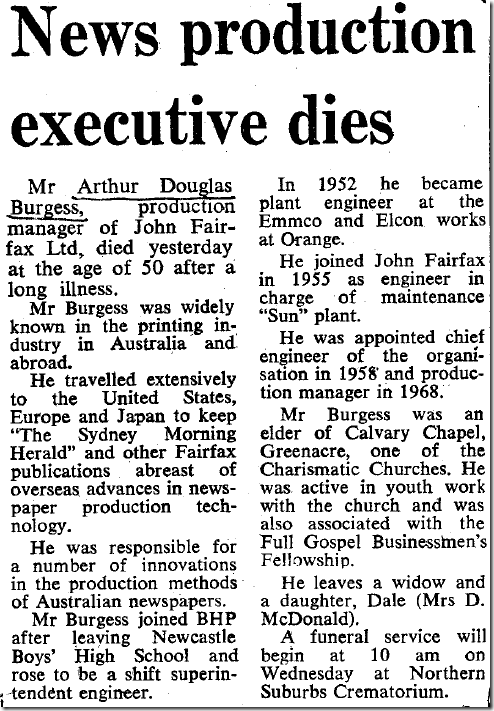
My other grandfather was also involved with Fairfax and the Sydney Morning Herald, but in the capacity of a typesetter on the printing presses.
Wednesday, March 09, 2011
Is knowledge all there is?
I spent a fair bit of time this week helping a client with their information strategy and information management policy. Their definition of information included “Emails, Databases, Documentation and Knowledge”, which is a mixed bag if ever I saw one!
Clearly they needed to get a better handle on what they were dealing with, so I introduced them to a little pyramid that I had worked on several years ago (back when I was thinking about pursuing a career in knowledge management). I call this the Wisdom Pyramid, and use it to help differentiate between raw data, meaningful information, contextualised knowledge and applied wisdom.
Wisdom Pyramid

The example I usually use to bring it to life is that of a traffic light changing colour from amber to red.
At a data level there is a single bit of information, isolated from context and basically without meaning, unless one is familiar with that particular data type.
That data becomes information when meaning is given to it so that a human can more easily understand it.
The information becomes knowledge when context is considered, in this case that the traffic light is one I am heading towards.
Wisdom is exhibited when that knowledge is applied to my situation, so that I stop the car at the red light.
The pyramid is pretty useful, although there is a catch with wisdom as we only call an action wise when knowledge is applied correctly to a situation. Incorrect application is at worst foolish, and at best thoughtless.
Much ado has been made about the management of corporate knowledge, especially the attempt to capture explicit knowledge, although tacit knowledge is also sometimes acknowledged as something that must be transferred. The real issue however is how do we inculcate wisdom into our staff so they make wise decisions and not foolish ones?
“Take hold of my words with all your heart; keep my commands, and you will live. Get wisdom, get understanding; do not forget my words or turn away from them. Do not forsake wisdom, and she will protect you; love her, and she will watch over you. The beginning of wisdom is this: Get wisdom. Though it cost all you have, get understanding.”
Proverbs 4:4-7 (NIV translation)
You grow wisdom by growing people, and that’s where most knowledge management should start – tools are useful (and Elcom has some good KM tools) but mentoring, teaching and encouraging wisdom in our people is where the real benefits come from.
Friday, February 11, 2011
Fresh design!
In case you’re reading an RSS feed, I have updated my blog design to use a core Blogger template, and done some (slightly) artistic tweaking to get a look that I’m happy with.
Thursday, February 10, 2011
Occasionally (Dis-)Connected is the Future
As web application developers we tend to build for always connected scenarios. They simplify the problem of web development and allow us to keep the complexity of our solution hidden on web and application servers back at corporate headquarters.
Pity the poor rich GUI developer who needed to handle both connected and disconnected modes – mainly for corporate management with laptops. This requirement increased the complexity of their applications and forced sharing of business logic with the client GUI layer. Recently mobile developers have realised the need to provide the same service, and with HTML5 web developers are now being pushed to as well.
At the same time, the ability of any client machine to get connected is increasing dramatically. Modern cities provide plentiful sources of free, commercial public and private wifi services, and most modern telecommunications devices allow for secondary use as internet modems.
It is now clear that most web applications/websites are likely to be accessed via mobile devices, and there are far more people with internet access via their mobile devices than via landlines/roaming broadband.
One might wonder whether disconnected clients still need to be supported, or whether the vast majority of clients in the vast majority of locations are best handled by assuming connected, always-on access?
The problem with this thinking is that it ignores a fundamental truth:
“Space is big. Really big.” – The Hitchhikers Guide to the Galaxy

OK, so these are not all apps that will be used in space (has the first iPhone gone to space yet?), but they can’t all assume that the user is always connected.
There are two fallacies with the premise of always-on access, the first is assuming that most people’s situations mimic the developers’ own ultra-connected, hyper-geek, lives, the second is limiting “everywhere” to the points on the daily commute. For most people in the world, in most places, there are going to be frequent losses of signal – even in Australia most telcos can’t get reliable mobile signal to all urban locations, let alone cover the vastness of our Outback.
Of course mobile developers know this is a problem, and might decry that their app can handle the phone losing and resuming signal flawlessly. But is there still value in the app when it is disconnected?
The most interesting opportunities lie with providing access to applications that can still provide value during the occasional disconnection – these are the applications that will be truly useful all the time and everywhere. For example the mapping application on my Nokia N85 can operate with three levels of connection:
- Connected to the internet and GPS.
In this mode I get the latest map updates and can tell where I am on the map. - Connected to GPS only.
In this mode the maps used are the ones stored locally but my current location is derived from GPS. - Disconnected.
In this mode the maps are available to be read, queried or manually moved around on, but my current location is not available.
Even in the most disconnected mode the maps are useful, I can lookup addresses and perform most of what I would have with an old-school street directory. When they connect further I get increasing amounts of value. Because of this sort of disconnected operation, the map and email applications are the most useful aspects of the phone to me (the other is the clock). They are more useful than a static application because they can occasionally connect and update themselves.
There is a term for this sort of behaviour that web developers have coined with websites that offer substantial value for all browser clients, but increase their value for some special browser clients.
The point is to view the extra potential as something great to have, but not necessary for the application to fulfil its value proposition.
I really think this is the killer feature for a mobile app – provided of course that there can still be a value proposition in the disconnected mode. I also think that the best mobile apps will be web apps that respond and adapt to the restrictions of the mobile space rather than custom built ghetto-apps that can only prosper in one particular mobile OS. But that can be another post …
Wednesday, November 17, 2010
Dependency injection our way
Like most everyone else practicing automated unit testing the developers at Elcom Technology have the issue to deal with of how to handle dependency injection – that is the exposure of a given object’s dependencies on other objects outside of the object so that the calling object can be made responsible for acquiring those dependent objects. In general this is most easily done by exposing said dependencies in the object’s constructor as required parameters – thus ensuring that the calling objects knows it needs to supply them when new'ing the object. So far, so good.
Recently (as of CM v7.2) we have introduced the Elcom.API library in an attempt to use the adapter pattern to present a more cogent, safer and easier to use interface to our CommunityManager.NET web CMS product. This is all well and good, but it means that to ensure testability we now have chains of dependencies throughout our application code – and declaring something a dependency of object A, when it is required by that object only to call object B, which then only needs it to call object C, creates some very smelly code.
Clearly we needed a dependency injection framework of some sort, but what should we use? Like Uncle Bob we didn’t want our DI framework to leave code smell throughout our projects. Well, we already have an object with all static/shared methods called Current. We use this to give an easy way of accessing some current state items, such as:
Dim a = Current.Configuration.ConnectionString
Dim b = Current.Configuration.EncryptionSettings
Dim c = Current.Configuration.ShortDateFormat
Dim d = Current.HttpContext
Dim e = Current.UrlId
Dim f = Current.User
Dim g = Current.UserId
Now we want to expand that to offer this sort of syntax to give easy access to services/repositories:
Dim myContSvc As Content.IContentService = Current.Service.ContentServiceGet()
That would give a simple way for object B to instantiate an IContentService without needing to declare it as a dependency to object A (but object C should still declare this in its constructor). For this to be truly useful, we have to be able to wire up the Content.Service container at runtime from either a configuration file (the default behaviour) or from code (during testing).
Sidebar: On DI Containers
To digress briefly, you will notice that the Current.Service container is a custom-built one, rather than a Unity or other DI framework’s container. The reason for this is twofold:
- We want to minimise our product’s dependencies on other products or open-source projects.
- We want developers using our product to be able to know in their IDE whether a given service can expect to be found wired up in the container, hence our use of methods like ContentServiceGet() and SecurityServiceGet().
That second reason is very important given that we are still actively developing the Elcom.API and pushing it out across all of our product’s many modules. One version of CommunityManager.NET may have very different abilities to the next one, and our partners’ developers may be dealing in multiple versions at once – hence the need for good IDE support.
Saved by the Static Property
So we like the syntax afforded us by static/shared methods, but they present problems when it comes to setting the values during testing. We looked at lots of options, including using delegates or even events, but they all made production code smelly in order to aid testing, and that didn’t sit well with us.
What we ended up doing was creating an IServiceContainer interface which declared all the types of services that could be returned, and using a factory within the Current.Service method to build a DefaultServiceContainer from a configuration file. We then provided a Current.ServiceContainer object which would contain the concrete version of IServiceContainer being used and which could be overwritten when testing.
''' <summary>
''' This holds the concrete implementation of IServiceContainer that is used. This is writable in order to help testability.
''' </summary>
''' <value>The concrete implementation of IServiceContainer that is used by Current.Service (or that is created by that function).</value>
Public Shared Property ServiceContainer As IServiceContainer = Nothing

Public Shared Function Service() As IServiceContainer
Dim currentContainer As IServiceContainer

If ServiceContainer IsNot Nothing Then
' retrieving the previously created one (or the testing one if its been written by our tests)
currentContainer = ServiceContainer
Else
Dim factory As New ContainerFactory

currentContainer = factory.ServiceContainer

' obviously we need to store/cache this and not just instantiate each time, so put it back into Current.ServiceContainer
ServiceContainer = currentContainer
End If

Return currentContainer
End Function
This approach works really well, provided you don’t mix production and testing code in the same application instance, which we never do. It doesn’t offer a generic container for developers to use for custom projects built on CommunityManager.NET – but there is nothing stopping them using Unity or other generic containers for their own purposes.
In case you’re wondering this has become a pattern we’re using across the Current object’s static/shared methods, including of course Current.HttpContext. Our caching at the moment is still fairly primitive (stick the object in the static property), but we are looking at making improvements in that area in this release too. If nothing else we have a proxy for Session objects that can be swapped at test time for something not dependent on web projects (although ASP.NET cache is available outside web projects anyway, See Scott Hanselman’s reference to using HttpRuntime.Cache outside ASP.NET).
Monday, September 20, 2010
Is blogrolling dead?
I just removed my Blogrolling links as Google warns me that the site was being used to distribute malware. It's a real shame, but it opens up the door to me looking at freshening the design for the first time in a few years.
Thursday, April 15, 2010
Using Enterprise 2.0
Continuing from my previous post, this one is more in line with the actual talk I gave on the 13th April at The Internet Show in Melbourne. We will be putting the actual transcript and slides of that talk (and video if the quality is good enough) up for people to download in the next week or so.
If you are interested in Web 2.0 and social software then you should have a look at Enterprise 2.0, which could be thought of as just Web 2.0 within the enterprise, although the originator of the idea, Andrew McAfee has a more precise definition for it:
“Enterprise 2.0 is the use of emergent social software platforms within companies, or between companies and their partners or customers.”
He places particular emphasis on the idea that it should be emergent, and for this reason excludes traditional intranets as part of the Enterprise 2.0 toolset.
“Emergent means that the software is freeform, and that it contains mechanisms to let the patterns and structure inherent in people’s interactions become visible over time.”
The whole idea of emergence is a tricky one, but a good example is the way Google assesses the relative merit of web pages based on the number (and quality) of inbound links, something which emerges over time as people find a page useful and link to it, rather than something pre-planned and orchestrated. A more concrete example is the idea of not placing paths in a garden up front, but allowing people’s actual movement to determine where paths should be placed – hence having them emerge as real patterns of use are known.
A point worth noting is that this means that the early structure or format of an Enterprise 2.0 tool can be expected to change over time. Initially it may seem somewhat useless, and not the sort of quality resource the business hopes it will be. This is a good thing as this quote from Art & Fear illustrates:
“The ceramics teacher announced on opening day that he was dividing the class into two groups. All those on the left side of the studio, he said, would be graded solely on the quantity of work they produced, all those on the right solely on its quality. His procedure was simple: on the final day of class he would bring in his bathroom scales and weigh the work of the ‘quantity’ group: fifty pound of pots rated an ‘A’, forty pounds a ‘B’, and so on. Those being graded on ‘quality’, however, needed to produce only one pot -albeit a perfect one - to get an "A". Well, came grading time and a curious fact emerged: the works of highest quality were all produced by the group being graded for quantity. It seems that while the ‘quantity’ group was busily churning out piles of work - and learning from their mistakes – the ‘quality’ group had sat theorizing about perfection, and in the end had little more to show for their efforts than grandiose theories and a pile of dead clay.”
The point about emergence is that it usually leads to a more appropriate and higher quality result than something meticulously planned from “theorizing about perfection”.
It is important to realise that the interactions that will take place, and help the emergence of patterns and structure, will be around ideas and especially the communication of ideas. Any Enterprise 2.0 initiative must have as its basis the ability for people to express, challenge, endorse and modify their and other’s ideas.
It can seem that some of this is a waste of people’s time, creating yet more ideas (some rubbish) for them to have to trawl through and interact with. We should remember that what ultimately matters is how it helps to optimise overall organisational effectiveness, not necessarily the impact on individual efficiency. Efficiency is one of the items that gets addressed as complexity emerges in the unstructured content that Enterprise 2.0 deals with – good tools will help you deal with this complexity.
What Can Enterprise 2.0 Do?
One of the biggest differences in Enterprise 2.0 tools is that they bring broadcasting to the average employee. This means that everyone can take advantage of the virtues of pull versus push publishing. Instead of identifying who should see something, and then pushing it into their email inboxes, or onto their IM clients, pull publishing allows the idea to be pulled into someone’s attention when they want it to be. Key enablers for pull publishing are RSS feeds and feed-readers, easily browsable content and micro-blogging enterprise tools like Yammer.
Another key difference is that most Enterprise 2.0 tools have come out of the consumer marketplace. That means they are highly usable and are designed from the ground up to be easy to learn. It turns out that’s a really important point, because it makes adoption across an enterprise much easier than most enterprise software. One key point is that the tools should address security and legal concerns, unlike most Web 2.0 tools, the content being dealt with is commercially sensitive.
Here are some business problems that Enterprise 2.0 helps address better than many other tools:
- Bring new employees up to speed
Wikis allow corporate knowledge to be easily captured, reviewed, edited and re-published as necessary so that new employees can quickly see the latest information. Internal blogs can operate the same way, but have the additional bonus of making it obvious who knows what, which gives the new employee someone to connect with. - Accurately forecast something
Some cutting edge applications of Enterprise 2.0 include crowd sourcing from within the organisation, using internal prediction markets to identify probable issues or forecasting delivery dates or prices. - Help customers
One of the oldest Enterprise 2.0 ideas, and something pre-dating Web 2.0, self-help community forums enable customers to be helped by other customers acting as a volunteer helpdesk. - Make things findable
Blogs (and intranets) that implement folksonomy tagging well allow users to easily tag things to find later and make content more browsable. Good enterprise search solutions that cover blogs, wikis, intranets and other Enterprise 2.0 tools also help make things more findable. - Broadcast ideas (pull not push)
As mentioned above, RSS and Yammer allow users to publish content in a way that broadcasts it outside their normal circle of influence, without creating disruptive interruptions as push publishing tends to. - Transparent project progress
Using a wiki, blog or a simple project management tool like Basecamp to track project progress both allows the emergence of patterns and can make those visible to people outside the immediate project team. - Communicate to the rest of the organisation
Department blogs can act as venues for communications between components of an organisation, and capture the discussions around those communications for future users to review and understand. - Helping upcoming leaders network
It is well established that upcoming leaders do better when their networks are more diverse and cross organisational boundaries. Internal blogs, the comments around them and a good flexible corporate directory tool can help upcoming leaders get noticed outside their existing teams and make the connections they will require to succeed. - Enhance employee self-learning
I’ve mentioned before David Maister’s opinion that most training is useless and the current focus of much etraining is actually on how to teach the individual to become a better learner, rather than pushing particular content at them. Wikis, blogs and social bookmarking all place a part in enabling better self-learning. - Improve innovation
Innovation is done by creative people, usually passionate creative people (see my previous post on passion) and Enterprise 2.0 helps them do this by making it easy for their ideas to be shared with internal audiences to inspire and call forth more ideas from them. Any Enterprise 2.0 tool can help innovation, but the best ones are often internal blogs.
Below is a great slidedeck that illustrates how someone might use these tools:
Meet Charlie - what is Enterprise2.0?
View more presentations from Scott Gavin.
What Do I Need in an Enterprise 2.0 Tool?
What should you look for in an Enterprise 2.0 tool?
You want to start with one that is more of a toolbox than a single tool, a good start is to look for something that offers blogs, wikis and a well-integrated corporate directory. You want something that is expandable, so you have the option to add more tools later.
Any tool you choose should play nice with other enterprise software, so you should find something that offers single sign-on (SSO) with your particular network, for example Active Directory/LDAP integration and that satisfies your IT department’s security needs.
Playing nicely with other Enterprise 2.0 tools is also mandatory. In this case that is mainly done by providing (and consuming) RSS feeds and integrating with your chosen enterprise search tool, but integration with a corporate directory offering will become necessary.
Basic functionality to allow emergent behaviours is also necessary, at a minimum this requires tagging and the ability to comment on anything, but micro-blogging and social bookmarking are also good candidates for this.
If you want to try something without involving IT, then you can look at various hosted solutions (such as Yammer), but eventually you should make sure that IT is happy with your choice of tools – especially of it ends up being something that you need to host yourselves, or if it will contain content vital to the continuity of the organisation in the case of a disaster.
Do I Need It?
Small companies, or larger ones faced with large amount of routines tasks and few opportunities for passionate creative work, might find that Enterprise 2.0 offers less robust ROI than most IT purchases, but even they may benefit from using Yammer or similar low-cost, hosted tools.
Companies in highly competitive environments, where the ability to be agile and quick to react to change is important, or organisations seeking to ignite the passion of their employees and find more effective ways to work will find that these tools are indispensable in helping flatten the organisation and efficiently distribute ideas.
Subscribe to:
Posts (Atom)