Thursday, March 10, 2011

Arthur Douglas Burgess

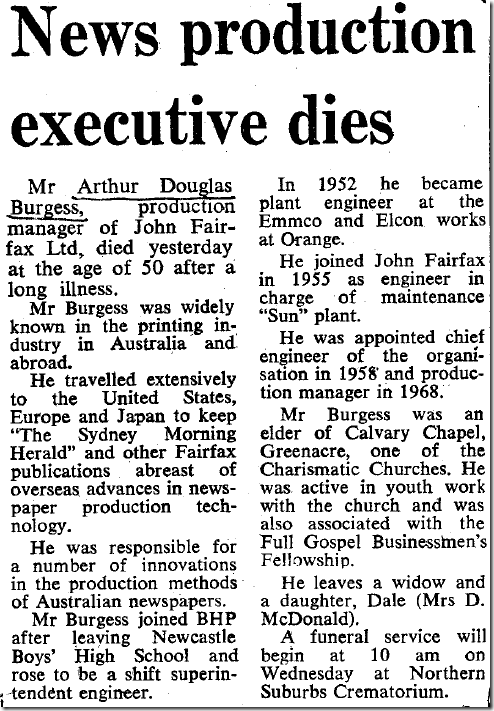
I just got delivered a very nice present. The National Library of Australia maintains an online archive of Australian newspapers for the last hundred years or so called Trove (http://trove.nla.gov.au/). A couple of weeks go I found a reference to my grandfather on my mother’s side, and a few days ago I ordered a copy of it via PDF. Thanks to the miracles of scanning + the internet, here it is:

Arthur Douglas Burgess Biography

My other grandfather was also involved with Fairfax and the Sydney Morning Herald, but in the capacity of a typesetter on the printing presses.

Wednesday, March 09, 2011

Is knowledge all there is?

I spent a fair bit of time this week helping a client with their information strategy and information management policy. Their definition of information included “Emails, Databases, Documentation and Knowledge”, which is a mixed bag if ever I saw one!

Clearly they needed to get a better handle on what they were dealing with, so I introduced them to a little pyramid that I had worked on several years ago (back when I was thinking about pursuing a career in knowledge management). I call this the Wisdom Pyramid, and use it to help differentiate between raw data, meaningful information, contextualised knowledge and applied wisdom.

Wisdom Pyramid

Wisdom Knowledge Information Data Pyramid

The example I usually use to bring it to life is that of a traffic light changing colour from amber to red.

At a data level there is a single bit of information, isolated from context and basically without meaning, unless one is familiar with that particular data type.

That data becomes information when meaning is given to it so that a human can more easily understand it.

The information becomes knowledge when context is considered, in this case that the traffic light is one I am heading towards.

Wisdom is exhibited when that knowledge is applied to my situation, so that I stop the car at the red light.

The pyramid is pretty useful, although there is a catch with wisdom as we only call an action wise when knowledge is applied correctly to a situation. Incorrect application is at worst foolish, and at best thoughtless.

Much ado has been made about the management of corporate knowledge, especially the attempt to capture explicit knowledge, although tacit knowledge is also sometimes acknowledged as something that must be transferred. The real issue however is how do we inculcate wisdom into our staff so they make wise decisions and not foolish ones?

“Take hold of my words with all your heart; keep my commands, and you will live. Get wisdom, get understanding; do not forget my words or turn away from them. Do not forsake wisdom, and she will protect you; love her, and she will watch over you. The beginning of wisdom is this: Get wisdom. Though it cost all you have, get understanding.”
Proverbs 4:4-7 (NIV translation)

You grow wisdom by growing people, and that’s where most knowledge management should start – tools are useful (and Elcom has some good KM tools) but mentoring, teaching and encouraging wisdom in our people is where the real benefits come from.

Friday, February 11, 2011

Fresh design!

In case you’re reading an RSS feed, I have updated my blog design to use a core Blogger template, and done some (slightly) artistic tweaking to get a look that I’m happy with.

Thursday, February 10, 2011

Occasionally (Dis-)Connected is the Future

As web application developers we tend to build for always connected scenarios. They simplify the problem of web development and allow us to keep the complexity of our solution hidden on web and application servers back at corporate headquarters.

Pity the poor rich GUI developer who needed to handle both connected and disconnected modes – mainly for corporate management with laptops. This requirement increased the complexity of their applications and forced sharing of business logic with the client GUI layer. Recently mobile developers have realised the need to provide the same service, and with HTML5 web developers are now being pushed to as well.

At the same time, the ability of any client machine to get connected is increasing dramatically. Modern cities provide plentiful sources of free, commercial public and private wifi services, and most modern telecommunications devices allow for secondary use as internet modems.

It is now clear that most web applications/websites are likely to be accessed via mobile devices, and there are far more people with internet access via their mobile devices than via landlines/roaming broadband.

One might wonder whether disconnected clients still need to be supported, or whether the vast majority of clients in the vast majority of locations are best handled by assuming connected, always-on access?

The problem with this thinking is that it ignores a fundamental truth:

“Space is big. Really big.”The Hitchhikers Guide to the Galaxy

hubbledeepfield

OK, so these are not all apps that will be used in space (has the first iPhone gone to space yet?), but they can’t all assume that the user is always connected.

There are two fallacies with the premise of always-on access, the first is assuming that most people’s situations mimic the developers’ own ultra-connected, hyper-geek, lives, the second is limiting “everywhere” to the points on the daily commute. For most people in the world, in most places, there are going to be frequent losses of signal – even in Australia most telcos can’t get reliable mobile signal to all urban locations, let alone cover the vastness of our Outback.

Of course mobile developers know this is a problem, and might decry that their app can handle the phone losing and resuming signal flawlessly. But is there still value in the app when it is disconnected?

The most interesting opportunities lie with providing access to applications that can still provide value during the occasional disconnection – these are the applications that will be truly useful all the time and everywhere. For example the mapping application on my Nokia N85 can operate with three levels of connection:

  1. Connected to the internet and GPS.
    In this mode I get the latest map updates and can tell where I am on the map.
  2. Connected to GPS only.
    In this mode the maps used are the ones stored locally but my current location is derived from GPS.
  3. Disconnected.
    In this mode the maps are available to be read, queried or manually moved around on, but my current location is not available.

Even in the most disconnected mode the maps are useful, I can lookup addresses and perform most of what I would have with an old-school street directory. When they connect further I get increasing amounts of value. Because of this sort of disconnected operation, the map and email applications are the most useful aspects of the phone to me (the other is the clock). They are more useful than a static application because they can occasionally connect and update themselves.

There is a term for this sort of behaviour that web developers have coined with websites that offer substantial value for all browser clients, but increase their value for some special browser clients.

Progressive enhancement

The point is to view the extra potential as something great to have, but not necessary for the application to fulfil its value proposition.

I really think this is the killer feature for a mobile app – provided of course that there can still be a value proposition in the disconnected mode. I also think that the best mobile apps will be web apps that respond and adapt to the restrictions of the mobile space rather than custom built ghetto-apps that can only prosper in one particular mobile OS. But that can be another post …

Wednesday, November 17, 2010

Dependency injection our way

Like most everyone else practicing automated unit testing the developers at Elcom Technology have the issue to deal with of how to handle dependency injection – that is the exposure of a given object’s dependencies on other objects outside of the object so that the calling object can be made responsible for acquiring those dependent objects. In general this is most easily done by exposing said dependencies in the object’s constructor as required parameters – thus ensuring that the calling objects knows it needs to supply them when new'ing the object. So far, so good.

Recently (as of CM v7.2) we have introduced the Elcom.API library in an attempt to use the adapter pattern to present a more cogent, safer and easier to use interface to our CommunityManager.NET web CMS product. This is all well and good, but it means that to ensure testability we now have chains of dependencies throughout our application code – and declaring something a dependency of object A, when it is required by that object only to call object B, which then only needs it to call object C, creates some very smelly code.

Clearly we needed a dependency injection framework of some sort, but what should we use? Like Uncle Bob we didn’t want our DI framework to leave code smell throughout our projects. Well, we already have an object with all static/shared methods called Current. We use this to give an easy way of accessing some current state items, such as:

Dim a = Current.Configuration.ConnectionString
Dim b = Current.Configuration.EncryptionSettings
Dim c = Current.Configuration.ShortDateFormat
Dim d = Current.HttpContext
Dim e = Current.UrlId
Dim f = Current.User
Dim g = Current.UserId

Now we want to expand that to offer this sort of syntax to give easy access to services/repositories:

Dim myContSvc As Content.IContentService = Current.Service.ContentServiceGet()

That would give a simple way for object B to instantiate an IContentService without needing to declare it as a dependency to object A (but object C should still declare this in its constructor). For this to be truly useful, we have to be able to wire up the Content.Service container at runtime from either a configuration file (the default behaviour) or from code (during testing).

Sidebar: On DI Containers

To digress briefly, you will notice that the Current.Service container is a custom-built one, rather than a Unity or other DI framework’s container. The reason for this is twofold:

  1. We want to minimise our product’s dependencies on other products or open-source projects.
  2. We want developers using our product to be able to know in their IDE whether a given service can expect to be found wired up in the container, hence our use of methods like ContentServiceGet() and SecurityServiceGet().

That second reason is very important given that we are still actively developing the Elcom.API and pushing it out across all of our product’s many modules. One version of CommunityManager.NET may have very different abilities to the next one, and our partners’ developers may be dealing in multiple versions at once – hence the need for good IDE support.

Saved by the Static Property

So we like the syntax afforded us by static/shared methods, but they present problems when it comes to setting the values during testing. We looked at lots of options, including using delegates or even events, but they all made production code smelly in order to aid testing, and that didn’t sit well with us.

What we ended up doing was creating an IServiceContainer interface which declared all the types of services that could be returned, and using a factory within the Current.Service method to build a DefaultServiceContainer from a configuration file. We then provided a Current.ServiceContainer object which would contain the concrete version of IServiceContainer being used and which could be overwritten when testing.

''' <summary>
''' This holds the concrete implementation of IServiceContainer that is used. This is writable in order to help testability.
''' </summary>
''' <value>The concrete implementation of IServiceContainer that is used by Current.Service (or that is created by that function).</value>
Public Shared Property ServiceContainer As IServiceContainer = Nothing

Public Shared Function Service() As IServiceContainer
Dim currentContainer As IServiceContainer

If ServiceContainer IsNot Nothing Then
' retrieving the previously created one (or the testing one if its been written by our tests)
currentContainer = ServiceContainer
Else
Dim factory As New ContainerFactory

currentContainer = factory.ServiceContainer

' obviously we need to store/cache this and not just instantiate each time, so put it back into Current.ServiceContainer
ServiceContainer = currentContainer
End If

Return currentContainer
End Function

This approach works really well, provided you don’t mix production and testing code in the same application instance, which we never do. It doesn’t offer a generic container for developers to use for custom projects built on CommunityManager.NET – but there is nothing stopping them using Unity or other generic containers for their own purposes.

In case you’re wondering this has become a pattern we’re using across the Current object’s static/shared methods, including of course Current.HttpContext. Our caching at the moment is still fairly primitive (stick the object in the static property), but we are looking at making improvements in that area in this release too. If nothing else we have a proxy for Session objects that can be swapped at test time for something not dependent on web projects (although ASP.NET cache is available outside web projects anyway, See Scott Hanselman’s reference to using HttpRuntime.Cache outside ASP.NET).

Monday, September 20, 2010

Is blogrolling dead?

I just removed my Blogrolling links as Google warns me that the site was being used to distribute malware. It's a real shame, but it opens up the door to me looking at freshening the design for the first time in a few years.

Thursday, April 15, 2010

Using Enterprise 2.0

Continuing from my previous post, this one is more in line with the actual talk I gave on the 13th April at The Internet Show in Melbourne. We will be putting the actual transcript and slides of that talk (and video if the quality is good enough) up for people to download in the next week or so.

If you are interested in Web 2.0 and social software then you should have a look at Enterprise 2.0, which could be thought of as just Web 2.0 within the enterprise, although the originator of the idea, Andrew McAfee has a more precise definition for it:

“Enterprise 2.0 is the use of emergent social software platforms within companies, or between companies and their partners or customers.”

He places particular emphasis on the idea that it should be emergent, and for this reason excludes traditional intranets as part of the Enterprise 2.0 toolset.

Emergent means that the software is freeform, and that it contains mechanisms to let the patterns and structure inherent in people’s interactions become visible over time.”

The whole idea of emergence is a tricky one, but a good example is the way Google assesses the relative merit of web pages based on the number (and quality) of inbound links, something which emerges over time as people find a page useful and link to it, rather than something pre-planned and orchestrated. A more concrete example is the idea of not placing paths in a garden up front, but allowing people’s actual movement to determine where paths should be placed – hence having them emerge as real patterns of use are known.

A point worth noting is that this means that the early structure or format of an Enterprise 2.0 tool can be expected to change over time. Initially it may seem somewhat useless, and not the sort of quality resource the business hopes it will be. This is a good thing as this quote from Art & Fear illustrates:

“The ceramics teacher announced on opening day that he was dividing the class into two groups. All those on the left side of the studio, he said, would be graded solely on the quantity of work they produced, all those on the right solely on its quality. His procedure was simple: on the final day of class he would bring in his bathroom scales and weigh the work of the ‘quantity’ group: fifty pound of pots rated an ‘A’, forty pounds a ‘B’, and so on. Those being graded on ‘quality’, however, needed to produce only one pot -albeit a perfect one - to get an "A". Well, came grading time and a curious fact emerged: the works of highest quality were all produced by the group being graded for quantity. It seems that while the ‘quantity’ group was busily churning out piles of work - and learning from their mistakes – the ‘quality’ group had sat theorizing about perfection, and in the end had little more to show for their efforts than grandiose theories and a pile of dead clay.”

The point about emergence is that it usually leads to a more appropriate and higher quality result than something meticulously planned from “theorizing about perfection”.

It is important to realise that the interactions that will take place, and help the emergence of patterns and structure, will be around ideas and especially the communication of ideas. Any Enterprise 2.0 initiative must have as its basis the ability for people to express, challenge, endorse and modify their and other’s ideas.

It can seem that some of this is a waste of people’s time, creating yet more ideas (some rubbish) for them to have to trawl through and interact with. We should remember that what ultimately matters is how it helps to optimise overall organisational effectiveness, not necessarily the impact on individual efficiency. Efficiency is one of the items that gets addressed as complexity emerges in the unstructured content that Enterprise 2.0 deals with – good tools will help you deal with this complexity.

What Can Enterprise 2.0 Do?

One of the biggest differences in Enterprise 2.0 tools is that they bring broadcasting to the average employee. This means that everyone can take advantage of the virtues of pull versus push publishing. Instead of identifying who should see something, and then pushing it into their email inboxes, or onto their IM clients, pull publishing allows the idea to be pulled into someone’s attention when they want it to be. Key enablers for pull publishing are RSS feeds and feed-readers, easily browsable content and micro-blogging enterprise tools like Yammer.

Another key difference is that most Enterprise 2.0 tools have come out of the consumer marketplace. That means they are highly usable and are designed from the ground up to be easy to learn. It turns out that’s a really important point, because it makes adoption across an enterprise much easier than most enterprise software. One key point is that the tools should address security and legal concerns, unlike most Web 2.0 tools, the content being dealt with is commercially sensitive.

Here are some business problems that Enterprise 2.0 helps address better than many other tools:

  • Bring new employees up to speed
    Wikis allow corporate knowledge to be easily captured, reviewed, edited and re-published as necessary so that new employees can quickly see the latest information. Internal blogs can operate the same way, but have the additional bonus of making it obvious who knows what, which gives the new employee someone to connect with.
  • Accurately forecast something
    Some cutting edge applications of Enterprise 2.0 include crowd sourcing from within the organisation, using internal prediction markets to identify probable issues or forecasting delivery dates or prices.
  • Help customers
    One of the oldest Enterprise 2.0 ideas, and something pre-dating Web 2.0, self-help community forums enable customers to be helped by other customers acting as a volunteer helpdesk.
  • Make things findable
    Blogs (and intranets) that implement folksonomy tagging well allow users to easily tag things to find later and make content more browsable. Good enterprise search solutions that cover blogs, wikis, intranets and other Enterprise 2.0 tools also help make things more findable.
  • Broadcast ideas (pull not push)
    As mentioned above, RSS and Yammer allow users to publish content in a way that broadcasts it outside their normal circle of influence, without creating disruptive interruptions as push publishing tends to.
  • Transparent project progress
    Using a wiki, blog or a simple project management tool like Basecamp to track project progress both allows the emergence of patterns and can make those visible to people outside the immediate project team.
  • Communicate to the rest of the organisation
    Department blogs can act as venues for communications between components of an organisation, and capture the discussions around those communications for future users to review and understand.
  • Helping upcoming leaders network
    It is well established that upcoming leaders do better when their networks are more diverse and cross organisational boundaries. Internal blogs, the comments around them and a good flexible corporate directory tool can help upcoming leaders get noticed outside their existing teams and make the connections they will require to succeed.
  • Enhance employee self-learning
    I’ve mentioned before David Maister’s opinion that most training is useless and the current focus of much etraining is actually on how to teach the individual to become a better learner, rather than pushing particular content at them. Wikis, blogs and social bookmarking all place a part in enabling better self-learning.
  • Improve innovation
    Innovation is done by creative people, usually passionate creative people (see my previous post on passion) and Enterprise 2.0 helps them do this by making it easy for their ideas to be shared with internal audiences to inspire and call forth more ideas from them. Any Enterprise 2.0 tool can help innovation, but the best ones are often internal blogs.

Below is a great slidedeck that illustrates how someone might use these tools:

What Do I Need in an Enterprise 2.0 Tool?

What should you look for in an Enterprise 2.0 tool?

You want to start with one that is more of a toolbox than a single tool, a good start is to look for something that offers blogs, wikis and a well-integrated corporate directory. You want something that is expandable, so you have the option to add more tools later.

Any tool you choose should play nice with other enterprise software, so you should find something that offers single sign-on (SSO) with your particular network, for example Active Directory/LDAP integration and that satisfies your IT department’s security needs.

Playing nicely with other Enterprise 2.0 tools is also mandatory. In this case that is mainly done by providing (and consuming) RSS feeds and integrating with your chosen enterprise search tool, but integration with a corporate directory offering will become necessary.

Basic functionality to allow emergent behaviours is also necessary, at a minimum this requires tagging and the ability to comment on anything, but micro-blogging and social bookmarking are also good candidates for this.

If you want to try something without involving IT, then you can look at various hosted solutions (such as Yammer), but eventually you should make sure that IT is happy with your choice of tools – especially of it ends up being something that you need to host yourselves, or if it will contain content vital to the continuity of the organisation in the case of a disaster.

Do I Need It?

Small companies, or larger ones faced with large amount of routines tasks and few opportunities for passionate creative work, might find that Enterprise 2.0 offers less robust ROI than most IT purchases, but even they may benefit from using Yammer or similar low-cost, hosted tools.

Companies in highly competitive environments, where the ability to be agile and quick to react to change is important, or organisations seeking to ignite the passion of their employees and find more effective ways to work will find that these tools are indispensable in helping flatten the organisation and efficiently distribute ideas.